

Wednesday, 29 January 2014


Monday, 27 January 2014
Pointer and Arrays
Pointer and Arrays
When an array is
declared, compiler allocates sufficient amount of memory to contain all the
elements of the array. Base address which gives location of the first element
is also allocated by the compiler.
Suppose we declare an
array arr,
int arr[5]={ 1, 2, 3, 4, 5 };
Assuming that the base address of arr is 1000 and each
integer requires two byte, the five element will be stored as follows
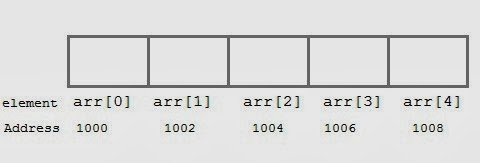
Here variable arr will give the base address, which is a constant pointer pointing to the element, arr[0]. Therefore arr is containing the address of arr[0] i.e 1000.
arr is equal to
&arr[0] // by default
We can declare a
pointer of type int to point to the array arr.
int *p;
p = arr;
or p = &arr[0];
//both the statements are equivalent.
Now we can access every element of array arr using p++ to
move from one element to another.
NOTE : You cannot decrement a pointer once incremented. p--
won't work.
Pointer to Array
As studied above, we can use a pointer to point to an Array,
and then we can use that pointer to access the array. Lets have an example,
int i;
int a[5] = {1, 2, 3, 4, 5};
int *p = a; // same
as int*p = &a[0]
for (i=0; i<5; i++)
{
printf("%d", *p);
p++;
}
In the aboce program, the pointer *p will print all the
values stored in the array one by one. We can also use the Base address (a in
above case) to act as pointer and print all the values.

Pointer to Multidimensional Array
A multidimensional array is of form, a[i][j]. Lets see how
we can make a pointer point to such an array. As we know now, name of the array
gives its base address. In a[i][j], a will give the base address of this array,
even a+0+0 will also give the base address, that is the address of a[0][0]
element.
Here is the generalized form for using pointer with
multidimensional arrays.
*(*(ptr + i) + j) is same as a[i][j]
Pointer and Character strings
Pointer can also be
used to create strings. Pointer variables of char type are treated as string.
char *str = "Hello";
This creates a string and stores its address in the pointer
variable str. The pointer str now points to the first character of the string
"Hello". Another important thing to note that string created using
char pointer can be assigned a value at runtime.
char *str;
str = "hello";
//Legal
The content of the string can be printed using printf() and
puts().
printf("%s", str);
puts(str);
Notice that str is pointer to the string, it is also name of
the string. Therefore we do not need to use indirection operator *.
Array of Pointers
We can also have
array of pointers. Pointers are very helpful in handling character array with
rows of varying length.
char *name[3]={
"Adam",
"chris",
"Deniel"
};
//Now see same array without using pointer
char name[3][20]= {
"Adam",
"chris",
"Deniel"
};
In the second
approach memory wastage is more, hence it is prefered to use pointer in such
cases.

Demostration of 2D Array using pointers in C
#include<stdio.h>
#include<conio.h>
void main()
{
int i,j;
int (*a)[4];
clrscr();
printf("ennter elements of array:");
for(i=0;i<3;i++)
{
for(j=0;j<3;j++)
{
scanf("%d",(*(a+i)+j));
}
}
printf("output is:\n");
for(i=0;i<3;i++)
{
for(j=0;j<3;j++)
{
printf("%d\t",(*(*(a+i)+j)));
}
printf("\n");
}
getch();
}
#include<conio.h>
void main()
{
int i,j;
int (*a)[4];
clrscr();
printf("ennter elements of array:");
for(i=0;i<3;i++)
{
for(j=0;j<3;j++)
{
scanf("%d",(*(a+i)+j));
}
}
printf("output is:\n");
for(i=0;i<3;i++)
{
for(j=0;j<3;j++)
{
printf("%d\t",(*(*(a+i)+j)));
}
printf("\n");
}
getch();
}
Friday, 24 January 2014
Multi-Dimensional Arrays in Pointers
Multi-Dimensional Arrays
In the previous chapter we noted that given #define ROWS 5
#define COLS 10
int multi[ROWS][COLS];
we can access individual elements of the array multi using
either:
multi[row][col]or
*(*(multi + row) + col)To understand more fully what is going on, let us replace
*(multi + row)with X as in:
*(X + col)Now, from this we see that X is like a pointer since the expression is de-referenced and we know that col is an integer. Here the arithmetic being used is of a special kind called "pointer arithmetic" is being used. That means that, since we are talking about an integer array, the address pointed to by (i.e. value of) X + col + 1 must be greater than the address X + col by and amount equal to sizeof(int). Since we know the memory layout for 2 dimensional arrays, we can determine that in the expression multi + row as used above, multi + row + 1 must increase by value an amount equal to that needed to "point to" the next row, which in this case would be an amount equal to COLS * sizeof(int).
That says that if the expression *(*(multi + row) + col) is to be evaluated correctly at run time, the compiler must generate code which takes into consideration the value of COLS, i.e. the 2nd dimension. Because of the equivalence of the two forms of expression, this is true whether we are using the pointer expression as here or the array expression multi[row][col].
Thus, to evaluate either expression, a total of 5 values must be known:
- The address of the first element of the array, which is returned by the expression multi, i.e., the name of the array.
- The size of the type of the elements of the array, in this case sizeof(int).
- The 2nd dimension of the array
- The specific index value for the first dimension, row in this case.
- The specific index value for the second dimension, col in this case.
void set_value(int m_array[][COLS])
{
int row, col;
for (row = 0; row < ROWS; row++)
{
for (col = 0; col < COLS; col++)
{
m_array[row][col] = 1;
}
}
}
And to call this function we would then use:
set_value(multi);Now, within the function we have used the values #defined by ROWS and COLS that set the limits on the for loops. But, these #defines are just constants as far as the compiler is concerned, i.e. there is nothing to connect them to the array size within the function. row and col are local variables, of course. The formal parameter definition permits the compiler to determine the characteristics associated with the pointer value that will be passed at run time. We really don’t need the first dimension and, as will be seen later, there are occasions where we would prefer not to define it within the parameter definition, out of habit or consistency, I have not used it here. But, the second dimension must be used as has been shown in the expression for the parameter. The reason is that we need this in the evaluation of m_array[row][col] as has been described. While the parameter defines the data type (int in this case) and the automatic variables for row and column are defined in the for loops, only one value can be passed using a single parameter. In this case, that is the value of multi as noted in the call statement, i.e. the address of the first element, often referred to as a pointer to the array. Thus, the only way we have of informing the compiler of the 2nd dimension is by explicitly including it in the parameter definition. In fact, in general all dimensions of higher order than one are needed when dealing with multi-dimensional arrays. That is if we are talking about 3 dimensional arrays, the 2nd and 3rd dimension must be specified in the parameter definition.
In the previous chapter we noted that given
    #define ROWS 5
    #define COLS 10

    int multi[ROWS][COLS];
we can access individual elements of the array multi using
either:
multi[row][col]or
*(*(multi + row) + col)To understand more fully what is going on, let us replace
*(multi + row)with X as in:
*(X + col)Now, from this we see that X is like a pointer since the expression is de-referenced and we know that col is an integer. Here the arithmetic being used is of a special kind called "pointer arithmetic" is being used. That means that, since we are talking about an integer array, the address pointed to by (i.e. value of) X + col + 1 must be greater than the address X + col by and amount equal to sizeof(int). Since we know the memory layout for 2 dimensional arrays, we can determine that in the expression multi + row as used above, multi + row + 1 must increase by value an amount equal to that needed to "point to" the next row, which in this case would be an amount equal to COLS * sizeof(int).
That says that if the expression *(*(multi + row) + col) is to be evaluated correctly at run time, the compiler must generate code which takes into consideration the value of COLS, i.e. the 2nd dimension. Because of the equivalence of the two forms of expression, this is true whether we are using the pointer expression as here or the array expression multi[row][col].
Thus, to evaluate either expression, a total of 5 values must be known:
- The address of the first element of the array, which is returned by the expression multi, i.e., the name of the array.
- The size of the type of the elements of the array, in this case sizeof(int).
- The 2nd dimension of the array
- The specific index value for the first dimension, row in this case.
- The specific index value for the second dimension, col in this case.
    void set_value(int m_array[][COLS])
    {
        int row, col;
        for (row = 0; row < ROWS; row++)
        {
            for (col = 0; col < COLS; col++)
            {
                m_array[row][col] = 1;
            }
        }
    }
And to call this function we would then use:
set_value(multi);Now, within the function we have used the values #defined by ROWS and COLS that set the limits on the for loops. But, these #defines are just constants as far as the compiler is concerned, i.e. there is nothing to connect them to the array size within the function. row and col are local variables, of course. The formal parameter definition permits the compiler to determine the characteristics associated with the pointer value that will be passed at run time. We really don’t need the first dimension and, as will be seen later, there are occasions where we would prefer not to define it within the parameter definition, out of habit or consistency, I have not used it here. But, the second dimension must be used as has been shown in the expression for the parameter. The reason is that we need this in the evaluation of m_array[row][col] as has been described. While the parameter defines the data type (int in this case) and the automatic variables for row and column are defined in the for loops, only one value can be passed using a single parameter. In this case, that is the value of multi as noted in the call statement, i.e. the address of the first element, often referred to as a pointer to the array. Thus, the only way we have of informing the compiler of the 2nd dimension is by explicitly including it in the parameter definition. In fact, in general all dimensions of higher order than one are needed when dealing with multi-dimensional arrays. That is if we are talking about 3 dimensional arrays, the 2nd and 3rd dimension must be specified in the parameter definition.
Strings, and Arrays of Strings in Pointers
Strings, and Arrays of Strings
Well, let's go back to strings for a bit. In the following all assignments are to be understood as being global, i.e. made outside of any function, including main().We pointed out in an earlier chapter that we could write:
char my_string[40] = "Ted";which would allocate space for a 40 byte array and put the string in the first 4 bytes (three for the characters in the quotes and a 4th to handle the terminating '\0').
Actually, if all we wanted to do was store the name "Ted" we could write:
char my_name[] = "Ted";and the compiler would count the characters, leave room for the nul character and store the total of the four characters in memory the location of which would be returned by the array name, in this case my_name.
In some code, instead of the above, you might see:
char *my_name = "Ted";which is an alternate approach. Is there a difference between these? The answer is.. yes. Using the array notation 4 bytes of storage in the static memory block are taken up, one for each character and one for the terminating nul character. But, in the pointer notation the same 4 bytes required, plus N bytes to store the pointer variable my_name (where N depends on the system but is usually a minimum of 2 bytes and can be 4 or more).
In the array notation, my_name is short for &myname[0] which is the address of the first element of the array. Since the location of the array is fixed during run time, this is a constant (not a variable). In the pointer notation my_name is a variable. As to which is the better method, that depends on what you are going to do within the rest of the program.
Let's now go one step further and consider what happens if each of these declarations are done within a function as opposed to globally outside the bounds of any function.
void my_function_A(char *ptr)
{
char a[] = "ABCDE"
.
.
}
void my_function_B(char *ptr)
{
char *cp = "FGHIJ"
.
.
}
In the case of my_function_A, the content, or value(s),
of the array a[] is considered to be the data. The array
is said to be initialized to the values ABCDE. In the case of
my_function_B, the value of the pointer cp is considered
to be the data. The pointer has been initialized to point to the
string FGHIJ. In both my_function_A and my_function_B
the definitions are local variables and thus the string ABCDE
is stored on the stack, as is the value of the pointer cp.
The string FGHIJ can be stored anywhere. On my system it
gets stored in the data segment.
By the way, array initialization of automatic variables as I have done in my_function_A was illegal in the older K&R C and only "came of age" in the newer ANSI C. A fact that may be important when one is considering portability and backwards compatibility.
As long as we are discussing the relationship/differences between pointers and arrays, let's move on to multi-dimensional arrays. Consider, for example the array:
char multi[5][10];Just what does this mean? Well, let's consider it in the following light.
char multi[5][10];Let's take the underlined part to be the "name" of an array. Then prepending the char and appending the [10] we have an array of 10 characters. But, the name multi[5] is itself an array indicating that there are 5 elements each being an array of 10 characters. Hence we have an array of 5 arrays of 10 characters each..
Assume we have filled this two dimensional array with data of some kind. In memory, it might look as if it had been formed by initializing 5 separate arrays using something like:
multi[0] = {'0','1','2','3','4','5','6','7','8','9'} multi[1] = {'a','b','c','d','e','f','g','h','i','j'} multi[2] = {'A','B','C','D','E','F','G','H','I','J'} multi[3] = {'9','8','7','6','5','4','3','2','1','0'} multi[4] = {'J','I','H','G','F','E','D','C','B','A'}At the same time, individual elements might be addressable using syntax such as:
multi[0][3] = '3' multi[1][7] = 'h' multi[4][0] = 'J'Since arrays are contiguous in memory, our actual memory block for the above should look like:
0123456789abcdefghijABCDEFGHIJ9876543210JIHGFEDCBA ^ |_____ starting at the address &multi[0][0]Note that I did not write multi[0] = "0123456789". Had I done so a terminating '\0' would have been implied since whenever double quotes are used a '\0' character is appended to the characters contained within those quotes. Had that been the case I would have had to set aside room for 11 characters per row instead of 10.
My goal in the above is to illustrate how memory is laid out for 2 dimensional arrays. That is, this is a 2 dimensional array of characters, NOT an array of "strings".
Now, the compiler knows how many columns are present in the array so it can interpret multi + 1 as the address of the 'a' in the 2nd row above. That is, it adds 10, the number of columns, to get this location. If we were dealing with integers and an array with the same dimension the compiler would add 10*sizeof(int) which, on my machine, would be 20. Thus, the address of the 9 in the 4th row above would be &multi[3][0] or *(multi + 3) in pointer notation. To get to the content of the 2nd element in the 4th row we add 1 to this address and dereference the result as in
*(*(multi + 3) + 1)With a little thought we can see that:
*(*(multi + row) + col) and
multi[row][col] yield the same results.
The following program illustrates this using integer arrays instead
of character arrays.
------------------- program 6.1 ----------------------
/* Program 6.1 from PTRTUT10.HTM 6/13/97*/
#include <stdio.h>
    #define ROWS 5
    #define COLS 10

    int multi[ROWS][COLS];
int main(void)
{
int row, col;
for (row = 0; row < ROWS; row++)
{
for (col = 0; col < COLS; col++)
{
multi[row][col] = row*col;
}
}
for (row = 0; row < ROWS; row++)
{
for (col = 0; col < COLS; col++)
{
printf("\n%d ",multi[row][col]);
printf("%d ",*(*(multi + row) + col));
}
}
return 0;
}
----------------- end of program 6.1 ---------------------
Because of the double de-referencing required in the pointer version,
the name of a 2 dimensional array is often said to be equivalent
to a pointer to a pointer. With a three dimensional array we would
be dealing with an array of arrays of arrays and some might say
its name would be equivalent to a pointer to a pointer to a pointer.
However, here we have initially set aside the block of memory
for the array by defining it using array notation. Hence, we are
dealing with a constant, not a variable. That is we are talking
about a fixed address not a variable pointer. The dereferencing
function used above permits us to access any element in the array
of arrays without the need of changing the value of that address
(the address of multi[0][0] as given by the symbol multi).
Thursday, 23 January 2014
how the pointer variables can be directly used in expressions
The program in below shows how
the pointer variables can be directly used in expressions. It also illustrates the order of evaluation
of expressions. For example, the
expression
4* - *p2 / *p1 + 10
is evaluated as follows:
((4 * (-(*p2))) / (*p1)) + 10
When *p1 = 12 and *p2 = 4, this expression evaluates to
9. Remember, since all the variables are
of type int, the entire evaluation is carried out using the integer arithmetic.
ILLUSTRATION OF POINTER EXPRESSIONS
Program
main()
{
int
a, b, *p1, *p2, x, y, z;
a
= 12;
b
= 4;
p1 = &a;
p2 = &b;
x
= *p1 * *p2 - 6;
y
= 4* - *p2 / *p1 + 10;
printf("Address of a = %u\n",
p1);
printf("Address of b = %u\n",
p2);
printf("\n");
printf("a = %d, b = %d\n", a,
b);
printf("x = %d, y = %d\n", x,
y);
*p2
= *p2 + 3;
*p1
= *p2 - 5;
z
= *p1 * *p2 - 6;
printf("\na = %d, b = %d,", a,
b);
printf(" z = %d\n", z);
}
Output
Address of a = 4020
Address of b = 4016
a = 12, b = 4
x = 42, y = 9
a = 2, b = 7, z = 8
Subscribe to:
Posts (Atom)